
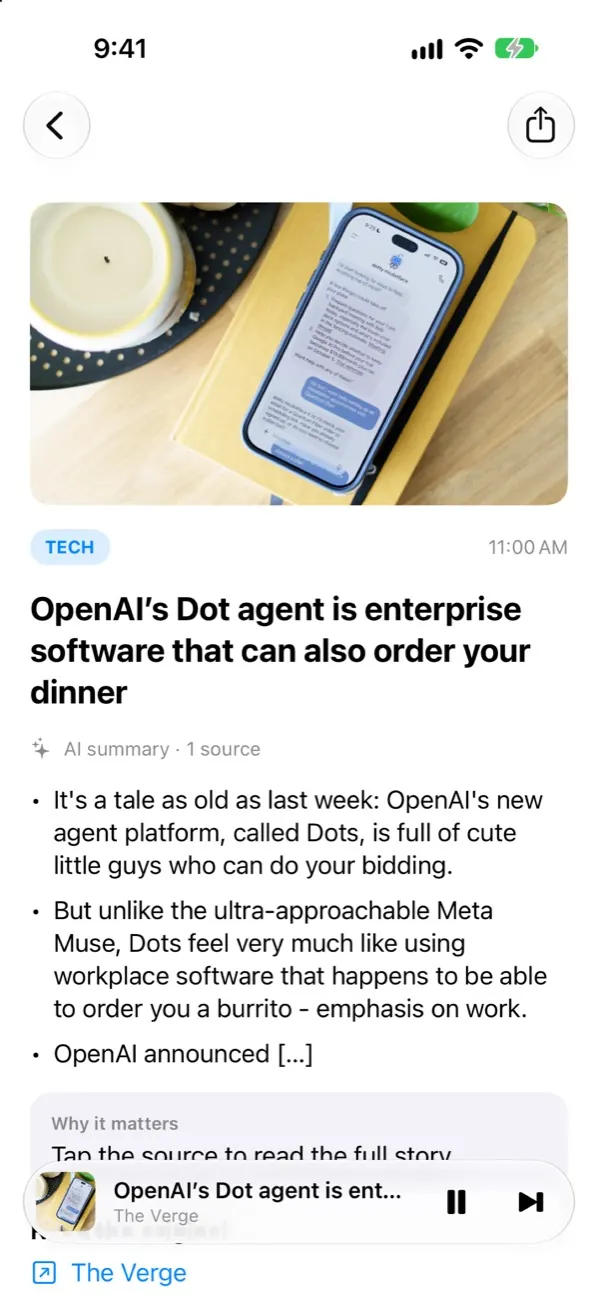

Why listen to the news?
Reading the news means looking at a screen. Listening frees your eyes and hands: you can catch up while you make breakfast, walk the dog, commute or work out. Text-to-speech used to sound robotic, which made long listening tiring. NewsPlay AI uses natural voices that run on your phone, so the stories sound smooth and keep playing even without a connection.
What NewsPlay AI reads to you
NewsPlay doesn’t pick a one-size-fits-all bulletin for you. It reads the news from the sources you choose:
- Suggested sources across world news, politics, business, technology, science, health, sports and entertainment.
- Local news from newspapers and TV stations near your town, or any city you choose.
- Any site with a feed, including blogs and newsletters, plus YouTube channels, subreddits and Bluesky or Mastodon profiles.
- Searches you follow: search the news for a company, a team or a subject, and add it as its own tab. New stories that mention it show up there and in your brief. Leave out words you don’t want.
Each story names its source, and you can open the original article at any time.
How to have the news read aloud
- Get the app from the App Store or Google Play and choose your topics.
- Choose your sources: tap suggestions, add your local news, or paste a link to any site.
- Pick a voice in Settings under Reader voice. Ten natural voices are built in, each with its own style; on iPhone you can also use Apple’s enhanced voices.
- Press play. Your brief starts with a short greeting and reads the newest stories first. Skip anything you’re not interested in with one tap.
Listen your way
- Change the speed from 0.8× to 1.5×, or set a sleep timer.
- Keep listening with the screen off, from the lock screen or with your headphone buttons.
- Want the whole story? Open it and play the full article, with the paragraph being read highlighted so you can follow along.
- Save stories to read or listen to later.
- On iPhone, start your brief from a widget, Siri or Control Center, and listen in the car with CarPlay.
Read aloud in your language
The app comes in 20 languages, including English, Spanish, French, German, Italian, Portuguese, Dutch, Polish, Russian, Turkish, Arabic, Japanese, Korean, Thai, Vietnamese, Indonesian and Chinese (Simplified and Traditional). Stories stay in the language they were written in, and NewsPlay reads each one in a matching voice. The natural Chinese voice is a one-time download.
Free to use
NewsPlay AI is free, with a few ads among the stories. On iPhone and iPad, NewsPlay AI Pro removes the ads. We don’t sell your data, and you can delete your account and everything in it from the app.
Frequently asked questions
Is there an app that reads the news out loud?
Yes. NewsPlay AI reads the latest stories from the sources you choose aloud, one after another, in a natural voice. It's free on iPhone, iPad and Android.
Can it read the full article, not just the headline?
Yes. Your brief reads a short summary of each story. Open any story to read the full article in a clean reading view, and play it to hear the whole article read aloud with the current paragraph highlighted.
Can I change the voice and the reading speed?
Yes. Choose a voice in Settings under Reader voice. Tap the player to change the speed (0.8x to 1.5x) or set a sleep timer.
Does it keep reading when my screen is off?
Yes. NewsPlay AI keeps playing in the background and on the lock screen, and works with your headphone controls.
Are the summaries always accurate?
Summaries can contain mistakes. Every story names its source and opens the original article, so you can always check the full story.
Press play on your news
Free on the App Store and Google Play.