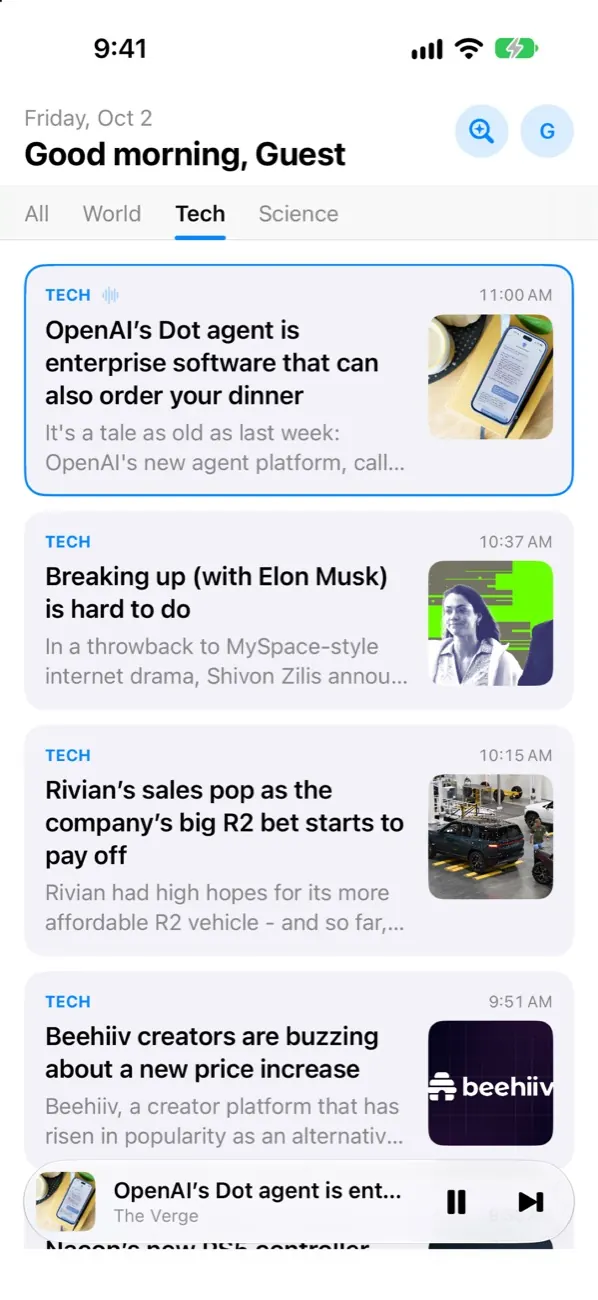


A podcast made from your own sources
Regular news podcasts are recorded on someone else’s schedule and cover what their editors pick. NewsPlay AI works the other way around: you choose the sources (big publishers, your local paper, niche blogs, a subreddit or a YouTube channel) and the app turns their latest stories into a brief you can listen to. When there’s news, there’s a new episode: pull down to refresh and your brief picks up the newest stories.
What a NewsPlay brief sounds like
Each brief opens with a short greeting and the date, then reads your stories newest first. Every story starts with its source, so you know who reported it. The story list follows along on screen, and you can jump to any story or skip ahead with one tap. Natural voices that run on your phone do the reading; ten are built in, each with its own style.
Set up your daily news briefing
- Install NewsPlay AI from the App Store or Google Play.
- Choose your topics (world, politics, business, tech, science, health, sports, entertainment and local news) and pick from suggested sources.
- Add anything else you follow by pasting a link to a site, a feed, a YouTube channel or a subreddit, or follow a search such as a team or a company as its own tab.
- Choose which tabs are read in your brief, and reorder the topic tabs the way you like.
- Press play each morning, or whenever you have a few minutes.
A real podcast player
- Mini player on every screen, full-screen player with a scrubber.
- Playback speed from 0.8× to 1.5×, sleep timer, and AirPlay on iPhone.
- Background playback, lock screen and headphone controls.
- CarPlay on iPhone, so your brief plays on the car’s screen.
- Home Screen widgets that show today’s top stories with a Play button.
Ready for the subway, the plane or the trail
Turn on Download for offline and NewsPlay gets your brief ready on Wi-Fi: audio, pictures and full articles. The natural voices run on the phone itself, so you can keep listening and reading with no connection at all.
News podcast app or news podcasts?
Both have their place. Produced news podcasts give you hosts, interviews and analysis. NewsPlay AI is for the other part of your day: a quick, up-to-date run through the headlines from sources you picked yourself, at your pace, whenever you press play. Many people use both.
Free, with Pro to remove ads
NewsPlay AI is free, with a few ads among the stories. On iPhone and iPad, NewsPlay AI Pro removes them, as a monthly subscription with a 7-day free trial or a one-time lifetime purchase.
Frequently asked questions
Is NewsPlay AI a podcast?
It's an app that plays your news like a podcast. Instead of recorded episodes, it reads the latest stories from the sources you choose aloud in a natural voice, with a podcast-style player.
Can I listen to NewsPlay AI in a podcast app such as Apple Podcasts or Spotify?
No. Your brief plays inside the NewsPlay AI app, which has its own player with speed control, a sleep timer and background playback. On iPhone it also plays through CarPlay.
How often is the brief updated?
Whenever your sources publish. Pull down on the story list to get the newest stories, and turn on Download for offline to have each brief ready on Wi-Fi.
Can I listen offline?
Yes. With Download for offline on, NewsPlay AI saves your brief's audio, pictures and articles on Wi-Fi, and the natural voices work without a connection.
Which devices does it work on?
iPhone, iPad and iPhone Duo (iOS 18 or later), and Android phones and tablets.
Press play on your news
Free on the App Store and Google Play.